
Hard Disk Drive - It is a non-volatile storage device which stores digitally encoded data on rapidly rotating platters with magnetic surface.
Types of HDD :
- IDE : Integrated Drive Electronics. IDE drives are also known as PATA drives( Parallel advance technology attachment )
- SATA : Serial advance technology attachment
- SCSI : Small Computer System Interface. SCSI is pronounced as scuzzy.
- SAS : Serial Attached SCSI
IDE / PATA (Integrated Drive Electronics Drive / Parallel Advance Technology Attachment Drive)


- IDE/PATA Drives have usually 40 pins.
- IDE/PATA Drives offer 133 MB/sec transfer rate.
- It sends 8 bit data at a time.
- PATA Cables are used to connect PATA HDD. Two drives can be connected in a single pata cable. One as master and other as slave. The configuration of master and slave is done by different combination of jumpers in the hdd.


- SATA Drives have usually 7 pins, 4 pins in pair of two for sending and receiving data and rest 3 pins are grounded.
- SATA Drives offers generally 300MB/sec transfer rate.
- It sends data bit by bit.
- SATA Cables are used to connect SATA HDD. Only one drive can be connected in a single sata cable.
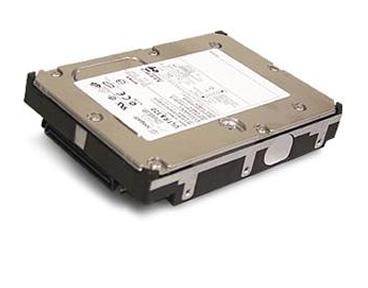

- SCSI Drives have usually 50 to 68 pins.
- SCSI Drive offers generally 640MB/sec transfer rate.
- This drives are hot swappable.
- SCSI cables are used to connect SCSI HDD. Maximum of 16 drives can be connected in a single scsi cable. Each hdd have a 8 bytes hexadecimal code known as WWN (world wide name) for its identification in the cable.


- SAS Drives generally offers 805 MB/sec transfer rate.
- This drives are hot swappable.
- SAS Cables are used to connect SAS Drives. Maximum of 128 drives can be connected in a single sas cable.
Not Bad Buddy! Keep the Good Work Up!
ReplyDeleteGadgets
Really great explanation.
ReplyDeleteHelpful for me.
keep it up
I hope you share more about it.
ReplyDeleteI will friends, thanks for supporting me
ReplyDeleteDisk drives for Serial-Attached SCSI (SAS) is distinguished by easy installation procedure. To ensure proper operation of these drives, you don't need to install any jumpers, terminators, or other settings. Read more from the guide on How to Install the SAS hard disk drive at: http://forums.techarena.in/guides-tutorials/1294004.htm
ReplyDeletethanx good job
ReplyDeleteOnce known as the Winchester drive, the hard disk or hard drive is an essential hardware that every computer desktop and server contain. And its functionality, is to store vast amount of digital data in a non-volatile form, so that data can be retained when the computer is powered off. Data is again accessed when the power is on.
ReplyDeletewww.electrocomputerwarehouse.com
thanks for provides information
ReplyDeleteAre you sure that SCSI hard drives can get up to 640 mb/s because everywhere that I've read says it's 80 mb/s. Good job anyway
ReplyDeletethanks for provides informations
ReplyDeletereally helpful... apt points...
ReplyDeleteThank you for explaining the differences between these hard disk drives.
ReplyDeletebuddy great explanations but u missed SSD Hard disk(Solid state Drive ) which used in Laptop
ReplyDeletewhat a great graphical representation. keep it up.
ReplyDeleteReally a Very Helpful Post. This will help me for sure. Keep it up! Looking for more posts.
ReplyDeleteawesome easy and useful information useful for me keep it up
ReplyDeleteit's helpful hope good posts more...............thnx
ReplyDeleteCan you please tell us more about SCSI and SAS,usually we dont see it much frequently as its been used by high performance servers .
ReplyDeletewhich is the latest model?
ReplyDeletewhich is the best model for desktop users?
great work dude.....thank you :)
ReplyDeleteNiCe WoRk BuDdY. :D
ReplyDeleteif I am buying a lap top, which is the latest technology out of these ????
ReplyDeletethanks for this information
ReplyDeleteWonderful resource!
ReplyDeleteGood Infomation.
ReplyDeletethank you,this is what i'm searching for,very helpful :)
ReplyDeleteThis comment has been removed by the author.
ReplyDeleteSSD contain no moving components. spinning magnetic discs are replaced by semiconductors. faster
ReplyDeleteI enjoyed this plz next time post more
ReplyDeleteGreat website!
ReplyDeleteBalıkesir
ReplyDeleteBursa
Mersin
Konya
Van
ZGC8
https://titandijital.com.tr/
ReplyDeleteamasya parça eşya taşıma
adıyaman parça eşya taşıma
hatay parça eşya taşıma
giresun parça eşya taşıma
ERY
aydın evden eve nakliyat
ReplyDeleteyozgat evden eve nakliyat
kırklareli evden eve nakliyat
antep evden eve nakliyat
konya evden eve nakliyat
42PUE
AC765
ReplyDeletetekirdağ muhabbet sohbet
batman telefonda görüntülü sohbet
bursa mobil sohbet bedava
kırklareli kızlarla canlı sohbet
kızlarla rastgele sohbet
amasya bedava sohbet uygulamaları
parasız görüntülü sohbet
kars sohbet sitesi
ankara telefonda görüntülü sohbet
02D24
ReplyDeletesesli sohbet odası
çankırı kadınlarla sohbet
tekirdağ canlı görüntülü sohbet odaları
sivas görüntülü sohbet yabancı
Kırşehir Yabancı Görüntülü Sohbet
görüntülü sohbet uygulamaları ücretsiz
yabancı canlı sohbet
kars yabancı görüntülü sohbet siteleri
Kırıkkale Canlı Görüntülü Sohbet Siteleri
75EA6
ReplyDeleteMefa Coin Hangi Borsada
Sohbet
Parasız Görüntülü Sohbet
Threads İzlenme Hilesi
Jns Coin Hangi Borsada
Binance Borsası Güvenilir mi
Telegram Abone Hilesi
Btcturk Borsası Güvenilir mi
Soundcloud Reposts Satın Al
DFD24
ReplyDeletePeriscope Beğeni Hilesi
Ceek Coin Hangi Borsada
Ön Satış Coin Nasıl Alınır
Bitranium Coin Hangi Borsada
Clysterum Coin Hangi Borsada
Gate io Borsası Güvenilir mi
Facebook Takipçi Hilesi
Kwai Beğeni Satın Al
Binance Referans Kodu