
Here is a technique "Registry Manipulation" for opening command prompt from a folder directly. Generally amateur programmers (may be java programmer, c or c++ programmer) or computer users open command prompt from Run or from the start menu. Its such a long process always opening cmd.exe from run or accessories and changing to the desired directory for compiling the files or for doing their work.
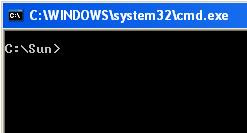
Here is a Registry Manipulation which will add 'command' to the folder context menu. By the help of which you can directly open command prompt logged on to the desired directory.
Steps:
- Download the registry file. (Click here to download).
- Double click the registry file "cmd_open_here.reg".
- A window will pop up saying "Are you sure you want to add information in C:\cmd open here.reg to the registry?" click Yes.

- After that just right click on any folder from where you want to open the Command Prompt logged on to that folder.



 Posts
Posts


