
The byte is a unit of digital information in computing and telecommunications, that most commonly consists of eight bits. Historically, a byte was the number of bits used to encode a single character of text in a computer and it is for this reason the basic addressable element in many computer architectures.
I have done some coding in java script to easily calculate byte, kilobyte, megabyte and gigabyte. Try Byte Converter
(Read more inside ..)
Showing posts with label web application. Show all posts
Showing posts with label web application. Show all posts
Friday, April 8, 2011
Byte Converter


|
Bookmark this post:
|


|
Thursday, November 26, 2009
Visualize Twitter trends region wise on a real time map
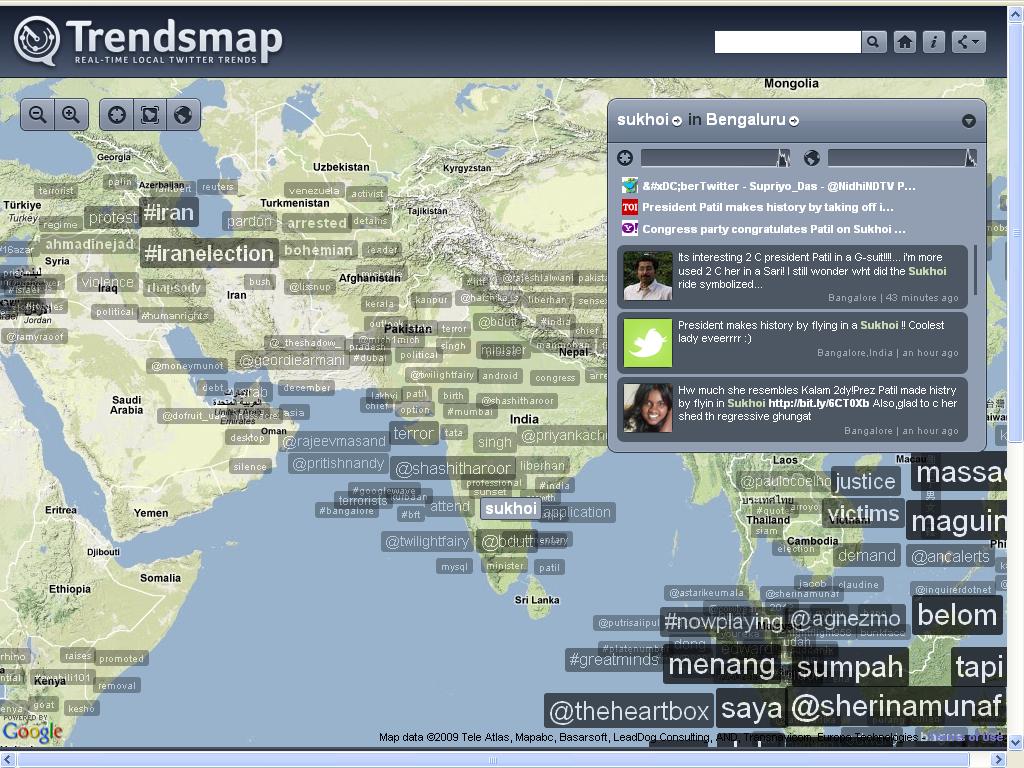
Good news for twitter addicts. As we all know twitter is famous micro blogging site where people shares messages.
Now, a new web application Trendsmap 'REAL-TIME LOCAL TWITTER TRENDS' is out. Where you can know What Topic Is Hot In Which Region all over the world. All this thing can be visualized on a real-time map.
(Read more inside ..)
|
Bookmark this post:
|
|
Friday, November 20, 2009
Green Robot: Know from Gmail contacts who are using Android

Google is the god of innovation. Usually green, orange, red bubble icon indicates whether the contacts in our Gtalk are available, ideal or busy. Google has added a invisible mode in Gmail's chat application.
A new google lab product is out Green Robot!. It will indicate whether your friends in the Gmail's chat application are using Android phones. A robot icon will appear in chat status before the name of the person who is using google chat from Android. From the above image you can visualize that Shirley is currently online from Android.
Google says
These icons can help you decide whether to tailor your conversation to the type of device that your chat buddy is using. For example, when you know the guy on the other end is using his Android phone, you may decide to send shorter, more concise chat messages.
Friends try this Google new experiment Green Robot. Just go to Labs. Scroll down you will see the Green Robot! by Chad Y and enable it.
Via Official Gmail Blog: New in Labs: Green robot icon
(Read more inside ..)
|
Bookmark this post:
|
|
Thursday, November 19, 2009
How to create ringtones from YouTube videos

Searching new ringtones for your pretty mobile phones. I have a site madringtones for you where you can create mp3 ringtones for your mobile phone from your favourite YouTube videos or any music file from your computer.
Steps:
- Open your favourite video in YouTube, whose mp3 ringtone you want to create for your mobile phone.
- Copy the link from the address bar of your favourite YouTube video eg: http://www.youtube.com/watch?v=7kV-5vc-vrk
- Open madringtones.org and paste the link of your favourite YouTube video you have copied from the address bar.
- You can upload files from your computer or any web link also.
- Click on the Play button, it will start uploading the file and then press Save to save the mp3 file
- After saving it will allow you to download the saved file in mp3,amr,ogg formats
- Now send the downloaded file to your mobile phone and enjoy the ringtones.
(Read more inside ..)
|
Bookmark this post:
|
|
Monday, November 16, 2009
Listen to Online Hindi FM Radio for Free
My new innovation
Technology + Hindi Songs
Now, listen to romantic bollywood songs while surfing internet.
Speed: 32Kbps
Server: www.1.fm
Station: Bombay Beats India

(Read more inside ..)
|
Bookmark this post:
|
|
Friday, November 13, 2009
Multiple login in Gtalk from the same computer

This hack is inspired from my previous post 'Multiple login in Yahoo Messenger from the same computer'. Friends now we will see how to login in multiple Gtalks from multiple IDs or same ID.
Steps to modify Google Gtalk for multiple login:
- Start > All Programs > Google Talk > Google Talk > Right Click on Google Talk Icon > Send To > Desktop (create shortcut) . All this is for creating a Gtalk shortcut in Desktop.
- Now Right Click on Gtalk shortcut icon which is in the desktop.
- Go to Properties

- Type '-nomutex' without quotes after googletalk.exe" giving a space in the Target text box. You can refer to the image below eg- googletalk.exe" -nomutex

- Click OK after typing '-nomutex' in the specified place.
- You can open multiple Gtalk from the Gtalk desktop shortcut icon only
- Now enjoy with your multiple Gtalks


|
Bookmark this post:
|
|
Tuesday, September 29, 2009
Free CSS Menu - High quality websites navigation menu - Part 1

Free CSS3 Menus for your websites. Cascading Style Sheets (CSS) is a style sheet language used to design the look and format of a document written in a markup language. Its most common application is to style web pages written in HTML and XHTML.
CSS used for developing the navigation menu is CSS level 3 validated. Just download the source file and make what ever changes you want to do. Best viewed in Firefox and Chrome.
Two variant of the navigation menu:
- 500px wide : Click here to view
- 820px wide : Click here to view
For using the menu in your HTML page, website or blog :
- Include the css file (menu.css or menu_long.css) in between the head section of your html page and upload the css file to your web server, where your webpage is stored. Otherwise upload it to any free hosting site like Google Pages, x10hosting and link the css.
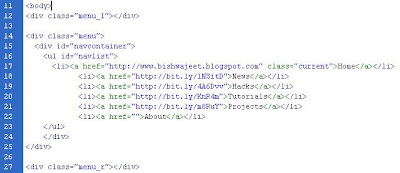 Copy and paste the the code from div class="menu_l" to div class="menu_r" from the source file(menu.html or menu_long.html) to your HTML page in between the body tag. Exactly as shown in the picture.


Download Source Files:
(Read more inside ..)
|
Bookmark this post:
|
|
Saturday, September 19, 2009
How to send your own fake email

Hey friends wann send an email to whoever you want. I have found a site 'anonymailer' that lets you send free fake emails to anyone you like. You can fool your boss, friend, girlfriends & anyone you want with this fake email service.
Conditions:
- Make sure that the From address you choose contains a real internet domain name. For instance, don't choose bush@the.government, choose bush@whitehouse.gov. If you choose a domain that hasn't been registered, the mail may not be delivered.
Send fake mail by yourself means manually by typing command through telnet by connecting to the mail server. (Click here)
(Read more inside ..)
|
Bookmark this post:
|
|
Wednesday, August 12, 2009
Google Wave - A new online communication tool is on its way

Google is launching a new web communication and collaboration tool for the digitizing generation "Google Wave". It will be available later this year. Basically its a new variant of social networking site or you can say a personal communication tool. It is designed in such a way that e-mail, instant messaging, wiki, and social networking will work together in a single web platform. Here people can communicate, work, share ideas and documents, edit google map and many more stuffs to do.

- Register yourself with Google Wave & get notified about it information.
- Developers: Those who are interested in contributing some of their ideas or wann develop application for wave process. Google is providing Google Wave Api. Just register a sandbox account and start participating in Google Wave process.
(Read more inside ..)
|
Bookmark this post:
|
|
Subscribe to:
Posts (Atom)


 Posts
Posts


