Saturday, January 19, 2013

Top 10 Free Internet Download Manager


This article showcases the top 10 Free Download Managers for Windows 7. While not all are freeware, most of them are and you will enjoy using their features from this list. Check out the Top 10 below-

Free Download Manager for Windows 7 Download and Review

Free Download Manager is an open-source download manager that has millions of users all over the world. It lets you download files or whole web sites from any remote server via HTTP, HTTPS, FTP and BitTorrent up to 6 times faster, even when downloading from slow sites. Free Download Manager accelerates downloads by splitting files into sections and then downloading them simultaneously from parallel servers and as a result download speed increases up to 600%. It is one of the highly rated download managers in the internet world. Some features of it are-
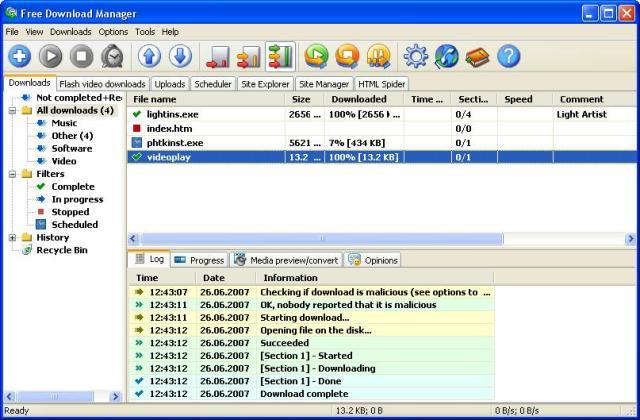
  • BitTorrent support
  • Built-in upload manager
  • Ability to download flash video from video sites, such as Youtube, MySpace videos, Dailymotion, Yahoo, etc and converting them to another video format, such as AVI, DivX, MPEG4, etc.


  • Download Free Download Manager for Windows 7 from - www.free-downloadmanager.net

    Orbit Downloader for Windows 7 Download and Review

    Orbit Downloader is a great tool for download acceleration. It has an intelligent download logic accelerator that features intelligent dynamic file segmentation and safe P2P downloading technology to accelerate your downloads. It is a light-weight, powerful and easy-to-use application. It supports most of the browsers available on the Internet. Some features are-
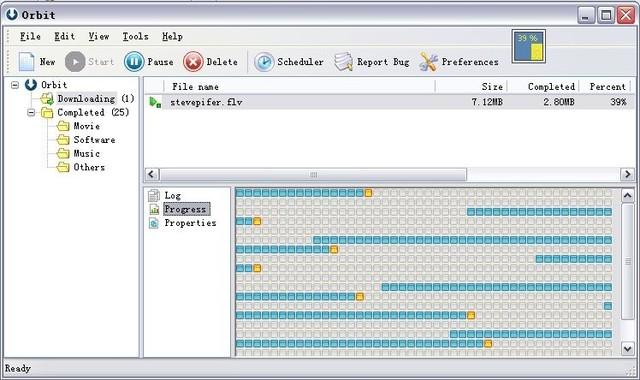
  • Download social music, social video and streaming media
  • Extreme download acceleration via Orbit Downloader's anonymous P2P OrbitNet
  • Super Light: micro-sized and resource-friendly
  • Supports RapidShare downloads
  • Supports Metalink downloads.


  • Download Orbit Downloader free download manager for Windows 7 from - www.orbitdownloader.com

    FlashGet for Windows 7 Download and Review

    FlashGet is a leading download manager and has the highest amount of users on the internet. It uses MHT(Multi-server Hyper-threading Transportation) technique, supports various protocols and has excellent document management features. FlashGet is a freeware without any adware or spyware. FlashGet accelerates download speeds up to 6-10 times. Some features of it are-
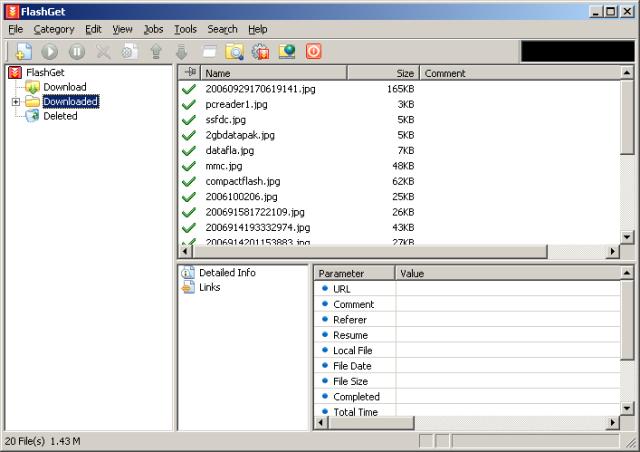
  • Calls anti-virus automatically
  • Support HTTP, FTP, BT, eMule and other various protocols
  • Powerful file management feature
  • Light on the system resources.


  • Download FlashGet free download manager for Windows 7 from - www.flashget.com

    Internet Download Manager for Windows 7 Download and Review

    Internet Download Manager is a tool to increase download speeds by up to 5 times, resume and schedule downloads. Internet Download Manager can also accelerate download up to 5 times from even a slow server. Comprehensive error recovery and resume capability will restart broken or interrupted downloads due to lost connections, network problems, computer shutdowns, or unexpected power outages. Includes site logins to use your premium Rapidshare, Megaupload, etc accounts with ease, directly and resumable. Internet Download Manager is not an open source software.
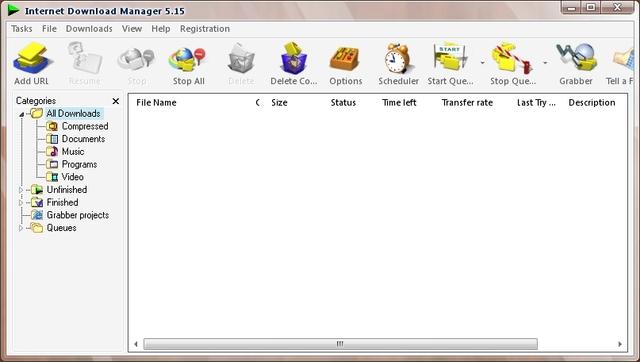


    Download Internet Download Manager free download for Windows 7 from - www.internetdownloadmanager.com 

    Download Master for Windows 7 Download and Review

    Download Master is a superior overall good performance download manager with convenient user interface. Download Master lets you to noticeably increase the speed of file download from the Internet using HTTP, HTTPS and FTP protocols. The acceleration in downloads by Download Master is achieved by splitting a file being downloaded into several parts and downloading these parts at the same time. Download Master can resume broken downloads from where they have been left off from HTTP, HTTPS and FTP servers. Download Master can be integrated with Internet Explorer, Firefox, Mozilla, Opera, Netscape and others.
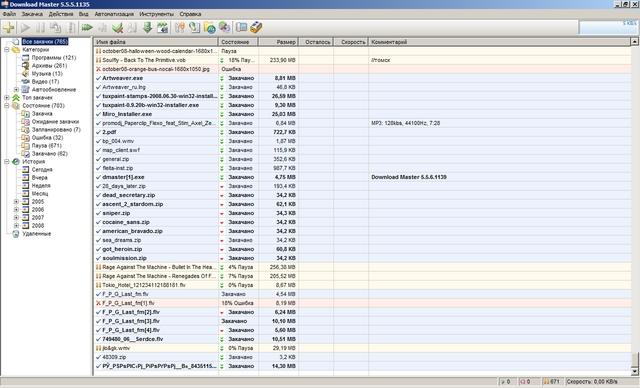


    Download Download Master free download manager for Windows 7 from - www.westbyte.com

    Download Accelerator Plus (DAP) for Windows 7 Download and Review

    Download Accelerator Plus (DAP) is a popular download manager with over 136 million users. DAP leverages patented technology, easy management of downloads and rich features including: multi connections, download security feature by ZoneAlarm, auto-recovery, privacy tools, faster downloads from fastest sources, preview of files as you download; broadband optimization; tabbed downloading. Availabe in 10 languages. Off late the demand for it has gone down.
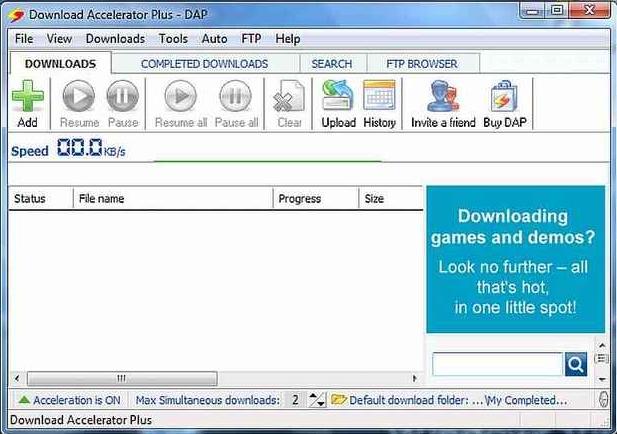


    Download Download Accelerator Plus (DAP) free download manager for Windows 7 from - www.speedbit.com

    GigaNet for Windows 7 Download and Review

    It uses Net Grid technology to increase download speeds 7 to 10 times.

    Download Gigaget free download manager for Windows 7 from - gigaget.en.softonic.com

    Website Ripper Copier for Windows 7 Download and Review

    Automatically download all content from a web page.

    Download Website Ripper Copier free download manager for Windows 7 from - website-ripper-copier.en.softonic.com

    WebZIP for Windows 7 Download and Review

    Collect web content to browse it offline. This software is a shareware.

    Download WebZIP free download manager for Windows 7 from - webzip.en.softonic.com

    GetRight for Windows 7 Download and Review

    This little download manager suits even the most slow servers. It features a huge range of options, starting from: crash and broken link recovery, set download time, segment downloading. This software is a shareware.

    Download GetRight free download manager for Windows 7 from - getright.en.softonic.com 
    (Read more inside ..)

    Thursday, September 27, 2012

    Seven reasons to buy the Nokia Lumia 920

    The Nokia Lumia 920 was shown off in New York last week and after checking out all of the coverage, I can say without a doubt that I will be purchasing one as soon as they are released. The color I choose will depend on which carrier(s) in the US get the high end Lumia, but with three carrier contracts I know at least one of my carriers will get the device. Based on just what we know so far, Microsoft was very tight lipped about Windows Phone 8, I have seven main reasons I think the Lumia 920 is the device for me.


    Reason one: PureMotion HD+ display

    The Nokia Lumia 900 has a ClearBlack display and some testing earlier this year revealed that theLumia 900 has a better outdoor display than the iPhone 4S and Galaxy S. Nokia is now taking that ClearBlack display technology to the next level and showed us all their PureMotion HD+ technology that looks to be the leading display on smartphones today.
    The PureMotion HD+ display automatically adjusts to sunlight glare, has those gorgeous deep blacks, provides super smooth scrolling through pixel translation speeds that are 2.5x faster than other phones, and works with fingernails, fingertips, and fingers covered with gloves. Yes, you can use your Nokia Lumia 920 in winter with gloves on without needing anything special in the gloves or any other gimmick. This new display just works and does so in nearly any environment you need. I recommend you read the white paper on the display (PDF link) to learn more about the technology.

    Reason two: PureView camera technology

    The Nokia 808 PureView sets the bar for all camera phones and really stands alone. Nokia's Lumia 920 doesn't have as much of that amazing technology, but it still has been shown to be an outstanding camera and when the device gets out of the prototype stage you can bet that reviewers will thoroughly test the camera. Nokia has an interesting white paper (PDF link) on the details of the camera technology used in the Lumia 920. As Nokia states this is the second phase in PureView technology and includes some of the core pieces such as high performance Carl Zeiss optics and powerful image processing algorithms. Low light performance is a major feature in this new camera, along with video image stabilization.

    Reason three: Nokia Maps

    Nokia Maps is the best service Nokia has ever offered and I use it on several different platforms. I love the functional offline maps and GPS navigation features in Nokia Maps Drive on my Lumia 900 and in the Lumia 920 Nokia improves that experience by rolling in several of the utilities that you can get now on the Lumia 900 and is taking Nokia Maps offline as well. You will find offline map support with free turn-by-turn navigation, daily commute and local traffic reports, Nokia Transport for public transit schedules, and Nokia City Lens for augmented reality discovery.

    Reason four: Windows Phone 8

    I would probably have placed this higher in my list if Microsoft would have allowed Nokia to actually show it off, but it seems Microsoft is running a bit behind on the software so manufacturers are not able to give demos yet. We have seen eight new platform improvementscoming in Windows Phone 8 and there are still many details remaining to be revealed. I look forward to seeing what Nokia does with NFC since they have been using it well on their Symbian devices and accessories. The new Start screen looks fantastic for the way I use my Windows Phones and WP8 just cannot get here fast enough for me.

    Reason five: Qi wireless charging

    I know this is not a huge feature, but it is something unique that distinguishes the Nokia Lumia from other Windows Phone 8 devices. I really appreciated the convenience of Qi charging with myDroid Charge and have been hoping there would be another manufacturer using this standard so I could pull out my pad and use it again. Nokia showed off several accessories that take advantage of this wireless charging technology and I am excited to try some out. The partnership deals with coffee shops is excellent and I hope we see more of these moving forward too.

    Reason six: Nokia Music

    Nokia Music just launched late last week for US Lumia owners and I have been using it every day since then. I am working on an article comparing it to the Zune Pass and other subscription services, but the big deal here is that it is FREE for Lumia owners. If you enjoy music, then getting a free service like this can provide significant regular savings to your smartphone ownership costs.

    Reason seven: Color selection

    Again, this may not mean much to many people, but I personally like having color options for my devices and plan to purchase the yellow Lumia 920 as long as it is supported on one of my carriers. Even if Nokia doesn't sell a ton of the yellow models, I think bold colors like this will help get people into the stores and generate conversation around the device, which is exactly what Nokia needs to do to gain marketshare.
    Nokia looks to be doing everything possible to help Windows Phone succeed and make sure they are around to compete in the smartphone space. I don't know what else people were expecting from Nokia or Windows Phone 8, but in my opinion they went above my expectations with unique features such as the amazing display and Qi wireless charging.
    (Read more inside ..)

    Friday, August 24, 2012

    New Nikon P7700 COOLPIX - Specification

    Nikon Corporation on 22nd Aug 2012 announced the release of the P7700, a high-performance compact digital camera loaded with a number of functions that allow users to enjoy full-scale photography similar to that possible with a digital-SLR camera. Price approx $500 USD.

    COOLPIX P7700 Primary Features:

    • Bright and fast NIKKOR zoom lens supporting 7.1x optical zoom for coverage of 28-mm to 200-mm focal lengths (equivalent in 35-mm [135] format) and maximum apertures of f/2–4
    • 1/1.7-inch backside illumination CMOS sensor with an effective pixel count of 12.2-million pixels
    • Recording of full-HD movies with stereo sound and a new movie custom setting mode
    • Support for a variety of accessories for superior system expansion
    • 3-inch vari-angle TFT LCD monitor with wide viewing angle
    • Special effects that can be applied with shooting
    • Designed for comfortable and natural operation
    • High-speed response with a power-up time of approximately 0.9 s*1,
    • Four exposure modes (P, S, A, M) and three user settings (U1, U2, U3)
    • Maximum ISO sensitivity setting of Hi 1 (ISO 6400 equivalent), and noise reduction filter
    • A variety of auto bracketing functions that vary exposure or white balance over a series of exposures automatically captured in quick succession for subtle variations in image expression*2 (exposure bracketing (Tv and Sv), white balance bracketing)
    • Built-in neutral density (ND) filter that reduces the amount of light that passes through the lens, enabling a three-step decrease in shutter speed
    • 19*3 scene modes, Scene Auto Selector mode with support for 9 scene modes
    • Built-in lens-shift vibration reduction (VR) function
    • Virtual horizon with two display options for visual confirmation that the camera is horizontally and vertically level

    Specification: 

    Effective pixels
    12.2 million
    Image sensor
    1/1.7-in. type CMOS; total pixels: approx. 12.76 million
    Lens
    7.1x optical zoom, NIKKOR lens; 6.0-42.8 mm (35mm [135] format equivalent: 28-200 mm); f/2-4
    Digital zoom magnification
    Up to 4x (35mm [135] format equivalent: approx. 800 mm)
    Vibration Reduction (VR)
    Lens shift
    Focus range*1
    [W]: Approx. 50 cm (1 ft 8 in.) to 8, Macro close-up mode: 2 cm (0.8 in.) to 8
    Monitor
    7.5 cm (3-in.), approx. 921k-dot, wide-viewing angle, vari-angle TFT LCD monitor with anti-reflection coating
    Storage media
    SD/SDHC/SDXC memory card*2
    Image size (pixels)
    12M [4000 x 3000], 8M [3264 x 2448], 4M [2272 x 1704], 2M [1600 x 1200], VGA [640 x 480], 3:2 [3984 x 2656], 16:9 9M [3968 x 2232], 1:1 [3000 x 3000]
    ISO sensitivity (Standard output sensitivity)*3
    ISO 80-1600, ISO 3200/Hi 1 (equivalent to 6400); (Manual setting is enabled in P/S/A/M exposure modes)
    Interface
    Hi-Speed USB
    Power sources
    Rechargeable Li-ion Battery EN-EL14 (supplied), Battery Charger MH-24 (supplied), AC Adapter EH-5b (used in combination with the Power Connector EP-5A) (optional)
    Battery life of
    still shooting*4
    Approx. 330 shots with EN-EL14 battery
    Dimensions
    (W x H x D)
    Approx. 118.5 x 72.5 x 50.4 mm (4.7 x 2.9 x 2.0 in.) excluding projections*5
    Weight
    Approx. 392 g (13.9 oz.) with battery and SD memory card*5
    Supplied accessories*6
    Rechargeable Li-ion Battery EN-EL14, Battery Charger MH-24, USB Cable UC-E17, Audio Video Cable EG-CP16, Camera Strap, ViewNX2 CD
    Optional accessories
    Speedlights (SB-910, SB-800, SB-700, SB-600, SB-400, SB-R200*7), Wireless Speedlight Commander SU-800, Lens Hood HN-CP17, 40.5mm screw-on filter 40.5 NC, Stereo Microphone ME-1, Hand Strap AH-CP1, Remote Control ML-L3, Remote Cord MC-DC2, GPS Unit GP-1


    Supplied Accessories with Nikon P7700 Digicam: AN-CP22 Strap, UC-E17 USB Cable, EG-CP16 Audio Video Cable, EN-EL14 Rechargeable Li-ion Battery, MH-24 Quick Charger, LC-CP26 Lens Cap, NikonView NX 2 CD-ROM
    (Read more inside ..)

    Tuesday, July 17, 2012

    How to access Weblogic Server Datasource from jsp

    Recently i was working on a project and I faced some security issues regarding the connection string. I was using the DriverManager.getConnection method>

    Connection con=DriverManager.getConnection("jdbc:oracle:thin:tom/tom@l91c214gx:1521:orcl");
    Later I searched and found a way to handle that. I accessed the Weblogic Server Datasource. Pulled the connection information from the datasource and made a connection to the database. :)


    You can find the code below. Change the jdbc/wb_datasource to your datasource name. Always prefix JNDI Name with jdbc like jdbc/wb_datasource
    eg: pool = (DataSource) env.lookup ("jdbc/xxxx");


    <%@ page import="java.sql.*" %>
    <%@ page import="java.util.Hashtable"%>
    <%@ page import="javax.naming.*"%>
    <%@ page import="javax.sql.DataSource"%>
    <%@ page import="java.util.*"%>
    
    
    <%try{
    
     Context env = null;
        DataSource pool = null;
        Hashtable ht = new Hashtable( );
    
        ht.put(Context.INITIAL_CONTEXT_FACTORY,"weblogic.jndi.WLInitialContextFactory");
        ht.put(Context.PROVIDER_URL,"t3://localhost:7001");
        
        env = new InitialContext(ht);
    
        //Lookup this DataSouce at the top level of the WebLogic JNDI tree
        pool = (DataSource) env.lookup ("jdbc/wb_datasource"); 
    
     //get a java.sql.Connection from the pool
        Connection conn = pool.getConnection( );
    
     // change the sql_retrive string according to your need
     String sql_retrive = "select * from test" ;


     Statement st1=conn.createStatement();
     st1.execute(sql_retrive);
    
     ResultSet rs=st1.getResultSet();
     
     ResultSetMetaData rsm = rs.getMetaData( );
     
     int colCount =  rsm.getColumnCount( );
    
     %> 
     <table><tr>
     <%
      //print column names
            for (int i = 1; i <=colCount; ++i) { %>
                <th><%=rsm.getColumnName(i)%> </th>
     <%  } %>
               </tr>
              <% while( rs.next( )){ %>
                    <tr>
        <%for (int i = 1;  i <=colCount; ++i) { %>
                    <td>    <%= rs.getString(i) %> </td>
        <%} //for loop ended%>  
                    </tr>
              <%} //while loop ended%>
     </table><% 
    }
    conn.close();
    st1.close();
    }
    catch(Exception ex){
    
    out.println(ex);
    
    }
    %>
    
    
    (Read more inside ..)

    Wednesday, June 27, 2012

    Top 10 P2P File Sharing Softwares

    A peer-to-peer (abbreviated to P2P) computer network is one in which each computer in the network can act as a client or server for the other computers in the network, allowing shared access to files and peripherals without the need for a central server. P2P networks can be set up in the home, a business or over the Internet.
    • eMule : eMule is one of the biggest and most reliable peer-to-peer file sharing clients around the world. Thanks to it's open source policy many developers are able to contribute to the project, making the network more efficient with each release. eMule is a filesharing client which is based on the eDonkey2000 network, but offers more features than the standard eDonkey client.
    • uTorrent : uTorrent is a powerful and efficient BitTorrent client for Windows. Most of the features present in other BitTorrent clients are present in uTorrent, including bandwidth prioritization, scheduling, RSS auto-downloading, and Mainline DHT. Additionally, uTorrent supports the protocol encryption joint specification and peer exchange. Unlike many torrent clients, it does not hog valuable system resources--typically using less than 6MB of memory, allowing you to use the computer as if it weren't there at all.
    • BitTorrent : BitTorrent's software client allows you to quickly download high-quality digital content such as video, music, and games. Available in over 20 languages, it leverages our community of over 70 million users to securely deliver files to your PC faster than anything else out there. Features include detailed graphs and stats on the health of digital media files provide you a safer, more controlled downloading experience, local peer discovery and automatic port mapping increase file transfer speed without the need to reconfigure routers or other hardware, and dynamic bandwidth management allows you to download content without disrupting Web browsing, e-mail, or other applications.
    • BitComet : BitComet is a fast and easy-to-use BitTorrent/HTTP/FTP download client. It is P2P file-sharing freeware and one of the most popular P2P protocols designed for high-speed distribution. BitComet supports simultaneous downloads, DHT networks (trackerless), a download queue, selected downloads in the Torrent package, fast-resume, disk caching, speed limits, auto port mapping, proxies, and IP filtering.
    • Vuze : Vuze is the most powerful bittorrent software application to Find, Download, and Play HD video content on the Web. With the latest release, you get powerful new search capabilities, along with the ability to play your HD videos on PC, Mac, iPhone, iPod, Apple TV, Xbox 360, PS3, PSP, and Tivo. Our award-winning P2P bittorrent technology enables users to quickly and easily download HD video with a single click.
    • MediaGet : MediaGet is a wonderful torrent-client software for searching and downloading media files which will be useful both for greenhorns and for experienced users. It uses open sources for search and helps you to download the files. You don't need to know how torrent works anymore, MediaGet will do everything for you. MediaGet also has integrated media player, which allows you to watch movies and listen to music online.
    • FrostWire : FrostWire is a free, open source BitTorrent client, first released as a fork of LimeWire. Gnutella support was dropped entirely, and now FrostWire only uses the BitTorrent network. You can now use FrostWire to send large files or entire folders to Colleagues, Friends and family.
    • Movie Torrent : The program's interface is basic, with buttons and drop-down menus at the top that allow access to the program's features. Things aren't particularly intuitive, and users who are new to torrent downloading will likely be confused. In fact, although the program's Web site states that users can search for torrents, we couldn't locate the search feature, leaving us on our own when it comes to finding torrents to download. Although the program has a Help menu, there's no actual Help file either within the program or online, which we found doubly frustrating given the program's unintuitive nature. Once we went to another Web site in search of torrents and found one we wanted to download, the program worked well enough, quickly opening the files and beginning the download. The program also makes it easy for users to turn existing files into torrents for sharing. The program is just fine for users who have used other torrent clients and are familiar with their features, but brand-new torrent users will likely find that Movie Torrent offers too little guidance.
    • Ares Galaxy : Ares is a peer to peer file sharing program that enables users to share any digital file including images, audio, video, software, documents. You may now easily publish your files through the Ares Network.As a member of the Ares network, you can also search and download just about any digital media file. With Ares you can also join or host chat rooms and meet new friends. Softgap is an international software company engaged in the business of providing cutting edge peer to peer filesharing software. Features include: Advanced search for all types of media files (Audio, Video, Games, Software, Photos). Very fast downloads from multiple users simultaneously. Automatic resume feature that assures the completion of all your requested downloads. A Media Player with play lists and full-screen mode. Ability to preview Audio and Video files while their download is in progress. Enhanced Library Manager ideally designed for organizing all your PC?s media files. Advanced media filter that prevents access to offensive files and viruses. Ability to create your chat room and chat with your friends while downloading. The most friendly and intuitive user interface. Bandwidth and queue control.
    • BitLord : BitLord is a p2p file-sharing program fully compatible with torrent files, which is one of the most popular p2p protocol designed for high-speed distribution of 100MB or GB-sized files. BitLord supports simultaneous downloads, download queue, selected downloads in torrent package, fast-resume, chatting, disk cache, speed limits, port mapping, proxy, and IP-filter.
    (Read more inside ..)

    Monday, May 14, 2012

    Lytro - Capture Living Pictures


    Lytro lets you take pictures like never before. Unlike a conventional camera that captures a single plane of light, the Lytro camera captures the entire light field, which is all the light traveling in every direction in every point in space.Capture living pictures with the press of a single button. By instantly capturing complete light field data, the Lytro camera gives you capabilities you've never had in a regular camera. Since you'll capture the color, intensity, and direction of all the light, you can experience the first major light field capability - focusing after the fact. Focus and re-focus, anywhere in the picture. You can refocus your pictures at anytime. And focusing after the fact, means no auto-focus motor. No auto-focus motor means no shutter delay. So, capture the moment you meant to capture not the one a shutter-delayed camera captured for you.
    The Lytro camera is small, light, and stunning. A great conversation piece. Which it should be, because it's not every day you can take pictures that make history.

    Features:

    Form follows function.
    The Lytro Light Field Camera boasts an 8X optical zoom lens with a constant f/2 aperture, capturing maximum light across the entire zoom range.

    Intelligent design.
    Extruded anodized aluminum structural skin. Center of gravity shutter button. Intuitive multi-touch screen. And less than eight ounces. What does it all mean? A meticulously designed camera that's lightweight yet solid, built for stability, and easy to use.

    Speed, indeed.
    Light field technology translates to faster snaps. Without an auto-focus motor, the Lytro's instant shutter means you don't lose time focusing. Plus, with instant power on, you can capture the perfect moment – not the moment after.


    Elegant omissions.
    What's missing? Nothing you'll miss. No auto-focus, no shutter lag, no unnecessary modes, dials, or settings. And no flash, because Lytro can handle many low light settings. So, no obstacles to the perfect shot.

    Specification:


    Price $499 $399 $399
    Color Red Hot Graphite Electric Blue
    Storage 750 Pictures 350 Pictures 350 Pictures
    Model 16GB Light Field Camera 8GB Light Field Camera 8GB Light Field Camera
    Storage Type Internal flash drive.
    Technology Lytro Light Field Sensor and Lytro Light Field Engine 1.0.
    Lens 8x optical zoom; Constant f/2 lens.
    Controls Power button: Shutter button; Zoom slider; Touchscreen.
    Display 1.52 in | 38.55mm back-lit LCD display with glass touchscreen.
    Exposure Tap on touchscreen to set exposure.
    Battery Long-life Li-Ion internal battery.
    File Output Light field picture file (.lfp).
    Light Field Resolution 11 Megarays: the number of light rays captured by the light field sensor.
    Software Includes a free desktop application for importing, processing and interacting with living pictures from the camera. It is built for Mac OS and requires Mac OS 10.6.6 or higher. A Windows application is in development.
    Picture Output Produces HD-quality interactive, living pictures.
    Picture Storage Free storage for living pictures on Lytro.com, 
    Picture Viewing View and interact with living pictures on the Lytro camera as well as any internet-connected computer, smartphone or tablet supported.
    Light Field Engine Version 1.0. This is the software that processes light fields to produce interactive pictures. Keep watching this space!
    Shell Ultra-light anodized aluminum structural skin.
    Grip Silicone Rubber.
    E-waste RoHS certified.
    Weight 7.55 oz | 214 g
    Dimensions 1.61 in x 1.61 in x 4.41 in | 41 mm x 41 mm x 112 mm
    Included Lytro Light Field Camera; Lens cap; Cleaner Cloth; Wrist Strap; 3.28 ft | 1 m Micro-USB cable for data transfer and charging.
    Optional Accessories Fast charger; Replacement lens cap. (Separate purchase required)


    Gallery:


    via Lytro.com
    (Read more inside ..)

    Wednesday, October 26, 2011

    Nokia Lumia 710 Windows Phone - Specification


    The purposely built, no-nonsense Nokia Lumia 710 can be personalized with exchangeable back covers and thousands of apps to bring the Lumia experience to more people around the world. The Nokia Lumia 710 is designed for instant social & image sharing, and the best browsing experience with IE9. It is available in black and white with black, white, cyan, fuchsia and yellow back covers. With the same 1.4 GHz processor, hardware acceleration and graphics processor as the Nokia Lumia 800, the Nokia Lumia 710 delivers high performance at an affordable price.

    Nokia’s second Windows Phone 7 device is running on the latest Mango 7.5 build that comes with Internet Explorer 9, photo editing tools,multitasking, new Xbox live, deep Facebook, Twitter, and LinkedIn integration, Contacts Groups with Live Tile support, and many others.


    Personalize it to suit you with colors and thousands of applications
    • Change covers to suit your mood - available in black and white with covers in five different colors
    • Personalize your start screen the way you want it
    • Group people based on how they fit into your life and pin individuals to the start screen for group conversations and photo sharing
    Designed for instant social experience and image sharing
    • Keep in sync with Facebook, Twitter and LinkedIn
    • Chat and SMS messages in one conversation
    • Shoot, share and see photos easily
    Best browsing experience with IE9
    • Browse with the fast and familiar Internet Explorer 9
    • Pin individual web pages to start menu
    • Instant search from Bing as you type
    • Switch smoothly between tasks
    Additional features and Services
    • Nokia Drive with turn by turn voice navigation available for more than 100 countries. Nokia Maps available from Marketplace at sales start
    • Nokia Music and Mix Radio: Enjoy music from the world’s most locally relevant catalog (14 million tracks). 100 great radio channels with something for everyone. Nokia
    • Music Store available in 20 countries and Mix Radio in 12 countries.
    • Contacts transfer help users migrate phonebook contacts from other devices and platforms
    • App Highlights promotes locally relevant apps and content
    • XBOX Live Hub offers cool games, capability to see friends’ presence and leaderboards, 3D Avatar control and creation
    • Outlook Mobile for corporate email and private email support
    Nokia Standard Sales package includes
    • Nokia Lumia 800 handset
    • Nokia Fast USB Charger AC-16
    • Nokia Charging and Data Cable CA-185CD
    • Nokia Stereo Headset WH-902
    • Soft cover, color match to phone
    • Quick Guide, User Guide and Product information leaflet
    Nokia Original Accessories
    • Nokia Purity Stereo Headset by Monster (in-ear), Nokia Purity HD Stereo Headset by Monster (on-ear)
    • Colourful and exciting portfolio of Bluetooth headsets, wireless speakers, car holder, charger, protective pouches, soft covers and functional cases
    Colors
    • Black, Cyan, Magenta
    Technical Profile
    • Networks: WCDMA 850/900/1900/2100, GSM/EDGE 850/900/1800/1900
    • Speed: HSDPA cat 10: 14.4 Mbps, HSUPA cat 6: 5.76 Mbps
    • Display: 3.7” WVGA (800x480) AMOLED capacitive touch ClearBlack display with pinch zoom, 2.5D curved glass seamlessly integrated to unibody
    • OS: Windows Phone Release - Mango
    • Memory: 16GB internal user memory, 512MB program memory
    • Camera: 8Mpix auto-focus Carl Zeiss, LED flash, Video capturing MPEG-4 720p @ 30 fps
    • Size/Weight: 116.5 mm x 61.2 mm x 12.1 mm (LxWxT) / 76.08 cc / 142 g
    • Connectivity: WLAN 802.11 b/g/n, Bluetooth 2.1, A-GPS, micro-USB connector and charging, 3.5mm AHJ connector, Accelerometer, Proximity, Magnetometer, ALS
    • Processor: 1.4 Ghz Single Core MSM8255 (WCDMA)
    • Audio: MP3 player, Audio jack: 3.5mm, Supported codecs: mp3, AAC, AAC+, eAAC+, m42, m4b, wma, EVRC, QCELP
    • Battery: 1450 mAh
    Operating times
    • Talk time: (GSM/WCDMA) up to 13 h/9.5h
    • Standby time: (GSM/WCDMA) up to 265h/up to 335 h
    • Music playback: up to 55 hours
    Nokia Lumia 710 Price in India : Around Rs.18,000 . Coming in December 2011 .
    (Read more inside ..)

    Nokia Lumia 800 Windows Phone - Specification


    The stunningly social Nokia Lumia 800 features head-turning design, vivid colors (cyan, magenta and black) and the best social and Internet performance, with one-touch social network access, easy grouping of contacts, integrated communication threads and Internet Explorer 9. It features a 3.7 inch AMOLED ClearBlack curved display blending seamlessly into the reduced body design, and a 1.4 GHz processor with hardware acceleration and a graphics processor. The Nokia Lumia 800 contains an instant-share camera experience based on leading Carl Zeiss optics, HD video playback, 16GB of internal user memory and 25GB of free SkyDrive storage for storing images and music.
    The Nokia Lumia 800 was revealed to the attendants of the Nokia World 2011 event, and, just like everyone predicted, it will be the flagship of the Lumia line-up (“Lumia” means “light,” and represents the dawns of a new Nokia start).Nokia announced that the flagship of the Lumia line-up will hit the market in November 2011, at a price of 420 EUR (about 580 USD, if you are reading this from US), taxes not included.


    Head-turning design
    • Smooth, one piece body
    • Screen that brings content to the surface
    • Vivid colors that stand out from the crowd
    Best social experience – instant social and image sharing
    • Instant combined Facebook, Twitter and LinkedIn feeds, chat and SMS messages in one conversation
    • From pocket to photo to Facebook in seconds
    Best browsing experience with IE9
    • New Internet Explorer 9 just like on your computer
    • Buttery smooth experience, lightning fast performance, broad support of Internet standards for HTML5 applications
    Additional features and Services
    • Nokia Drive with turn by turn voice navigation available for more than 100 countries. Nokia Maps available from Marketplace at sales start
    • Nokia Music and Mix Radio: Enjoy music from the world’s most locally relevant catalog (14 million tracks). 100 great radio channels with something for everyone. Nokia Music Store available in 20 countries and Mix Radio in 12 countries.
    • Contacts transfer help users migrate phonebook contacts from other devices and platforms
    • App Highlights promotes locally relevant apps and content
    • Excellent camera. Superior shooting with Carl Zeiss optics and HD video
    • XBOX Live Hub offers cool games, capability to see friends’ presence and leaderboards, 3D Avatar control and creation
    • Outlook Mobile for corporate email and private email support
    Technical Profile
    • Networks: WCDMA 850/900/1900/2100, GSM/EDGE 850/900/1800/1900
    • Speed: HSDPA cat 10: 14.4 Mbps, HSUPA cat 6: 5.76 Mbps
    • Display: 3.7” WVGA (800x480) AMOLED capacitive touch ClearBlack display with pinch zoom, 2.5D curved glass seamlessly integrated to unibody
    • OS: Windows Phone Release - Mango
    • Memory: 16GB internal user memory, 512MB program memory
    • Camera: 8Mpix auto-focus Carl Zeiss, LED flash, Video capturing MPEG-4 720p @ 30 fps
    • Size/Weight: 116.5 mm x 61.2 mm x 12.1 mm (LxWxT) / 76.08 cc / 142 g
    • Connectivity: WLAN 802.11 b/g/n, Bluetooth 2.1, A-GPS, micro-USB connector and charging, 3.5mm AHJ connector, Accelerometer, Proximity, Magnetometer, ALS
    • Processor: 1.4 Ghz Single Core MSM8255 (WCDMA)
    • Audio: MP3 player, Audio jack: 3.5mm, Supported codecs: mp3, AAC, AAC+, eAAC+, m42, m4b, wma, EVRC, QCELP
    • Battery: 1450 mAh
    Operating times
    • Talk time: (GSM/WCDMA) up to 13 h/9.5h
    • Standby time: (GSM/WCDMA) up to 265h/up to 335 h
    • Music playback: up to 55 hours
    Nokia 800 Lumia Price in India will be Rs. 29,000 approx.
    (Read more inside ..)

    Saturday, September 24, 2011

    How to activate the new facebook look 'Timeline' now | f8

    Facebook F8 conference held on yesterday and introduce new design to facebook which is very attractive and useful. But now this feature is only available for developers only not for all. So we have to activate new design manually. Facebook’s new look is appearance of this new course has been developed to attract everyone. If you like to bring facebook new design please follow the steps which is given below.


    Steps
    • Visit the link https://developers.facebook.com/apps

    •  

    •  Next click the Create new app button which is given top right side corner.

    •  

    •  Next window will open it showing  App Display Name and  App namespace you fill this two column anything you want. But the namespace column your words will be available.

    •  

    • Next window will open to ask Security code fill correctly and click submit button and you will go to next level and click Open Graph link see below image to better understanding.

    •  
    • Next window will open and fill that columns for your words simply and click Get Started

    •  

    • Next click the Save changes and Next button

    •  

    • Finally your app is ready and your window will be like below the image

    •  

    • Next you go to your profile page and timeline message waiting for you


    • Finally your facebook New Design changed


    Video

    (Read more inside ..)

    Thursday, May 19, 2011

    U2opia Launches Fonetwish Service For Facebook Access on Airtel in India


    U2opia Mobile, a Singapore-based mobile solutions provider has launched Fonetwish, a platform for accessing Facebook via USSD (Unstructured Supplementary Service Data) in partnership with telecom provider Airtel. The service has been developed jointly with Facebook and it’s the first of its kind.
    USSD (Unstructured Supplementary Service Data) is a menu-based system that allows interfacing with content based services. Unlike a normal browser, the USSD menu acts as browser to pull content to the phone, hence it does so without using the internet or activating GPRS capabilities.

    Airtel’s 150 million Indian customers will be able to update their Facebook status for free, but to use other features like viewing, commenting, posting on friends walls, confirming friend requests, ‘Like’ news feeds, view notifications and finding and adding friends, they will have to pay a minimal charge of Re 1 per day.

    The users will have to dial *325# (“*fbk#” for non-qwerty mobile handsets) from their handsets which will open a menu that will prompt the user to enter their Facebook username and password and after the one-time registration, a text menu is displayed for browsing through content.


    “Although smartphones are available in India, the number of users are not very high. Fonetwish will allow everyone with a mobile phone to access Facebook on their mobiles,” said Sumesh Menon, Co-Founder and CEO, U2opia Mobile, speaking to Techcircle.in. “Currently the USSD based service is only available on Airtel but talks are ongoing with other telecom operators for similar services. We are also looking at expanding our services to other countries like Indonesia and Philippines.”
    (Read more inside ..)

    Wednesday, May 18, 2011

    Steps to include Indian Rupee Symbol Font in MS Word, Excel, PowerPoint, Gmail, Facebook, Twitter and in Browsers got easier with Unicode recommended code position


    Foradians who first helped you type the rupee symbol on your computers with their legendary Rupee Foradian font has now come up with a quick and easy solution which will make you type the rupee symbol with out changing the keyboard, while sticking to the Unicode standard. Now its possible to type India rupee symbol in Microsoft Word, Excel, PowerPoint, Gmail, Facebook, Twitter and Mozilla. Currently its not supported in IE and Google Chrome, waiting for ISO approval.
    Steps to type Indian rupee symbol:

    • Download this file Rupee_Keyboard.zip .
    • Extract the contents of the zip file.
    • First you have to install the new fonts.
    • Double click the Rupee Installer.exe File and follow the instructions.
    • This will install four new fonts to your computer with support for new rupee symbol in Unicode recommended code position.
    • Then double click the Keyboard Install.exe file.
    • This will install a new keyboard layout in your computer
    • To enable the keyboard layout selector right click on the task bar and select language bar from the toolbars menu.
    • Now you can click on the small keyboard icon and enable the Rupee Foradian Keyboard Layout.
    • Double check the keyboard layout is active.
    • Now you can use the grave accent key on the keyboard to type the rupee symbol by selecting the Rupee Foradian Standard fonts.
    • You can set Rupee Foradian Standard as the default font in browser and start using the rupee symbol in any applications like gmail, twitter or facebook.


    If you can see only squares instead of rupee symbol, please check whether the font selected is "Rupee Foradian Standard" or  Rupee Foradian Keyboard Layout is enabled or not

    (Read more inside ..)

    Sunday, May 1, 2011

    Sony Tablet S1, S2 with Android 3.0


    Sony Corporation announces “Sony Tablet” that delivers the perfect combination of hardware, content and network with seamless usability for a high-quality, engaging entertainment experience. Based on decades of engineering heritage, Sony is developing two tablets with unprecedented design, including S1 (codename) which is optimized for rich media entertainment and S2 (codename) which is ideal for mobile communication and entertainment. “Sony Tablet” will become available in the global market starting in fall 2011.

    “Sony Tablet” is equipped with the latest Android 3.0 which is designed for devices with larger screen sizes. Both tablets are WiFi and WAN (3G/4G) compatible and users can not only browse the internet or check e-mail but they can also smoothly access digital content including videos, games and books through Sony’s premium network services and more, on-the-go at any time.

    Sony S1


    Sony S2


    Sony Tablet S1, S2 Specification
    • S1 has 9.4-inch display for enjoying the web and rich content on a large screen.
    • S2 has two 5.5-inch displays that can be folded for easy portability.
    • Android 3.0
    • Because of Sony’s rapid response technologies, users can perform smooth, quick touch-screen operations and enjoy fast and efficient website loading.
    • Through Qriocity music and video services, users can enjoy rich video and music content. Also, through PlayStation®Suite, users can immerse themselves in high quality first generation PlayStation® titles.

    In 2010, Sony launched a network platform called “Qriocity” which connects many of Sony’s network-enabled devices, and has been expanding its services into global markets.


    (Read more inside ..)

    Friday, April 8, 2011

    Byte Converter

    The byte is a unit of digital information in computing and telecommunications, that most commonly consists of eight bits. Historically, a byte was the number of bits used to encode a single character of text in a computer and it is for this reason the basic addressable element in many computer architectures.

    I have done some coding in java script to easily calculate byte, kilobyte, megabyte and gigabyte. Try Byte Converter (Read more inside ..)

    Thursday, January 20, 2011

    How to save facebook chat history

    Sometimes you want to go back and read an old chat that you had with someone on Facebook, probably this facility is provided by Facebook till date. But you can save all your Facebook chat history with a simple trick.

    Steps to save facebook chat history:

    To save Facebook chat history you have to chat with your friends in Pidgin. Then only you can able to save it.

    • Download Pidgin and install it.
    • Open Pidgin.
    • Go to "Accounts" and select "Manage Accounts."
    • On the Basic tab, enter the following info:
      • Protocol: XMPP
      • Username: for this log on to Facebook, Click on the Profile link (top right side) after that see the address bar you will get a link like "http://www.facebook.com/home.php#!/bishwajeet.naik". So, bishwajeet.naik is the username for me. For your case the text after "http://www.facebook.com/home.php#!/" is the username.
      • Domain: chat.facebook.com
      • Resource: Pidgin
      • Password: your Facebook password
      • Local alias: your name or any name (just for alias)
    • Click the Advanced tab, then enter the following info:
      • Connect port: 5222
      • Connect server: chat.facebook.com
      • Uncheck the box labeled "Require SSL/TLS"

    • Click on any of your friends in the friends list in Pidgin.
    • A chat window will open.
    • Go to Conversation -> View Log.
    • Now you can see all the chat history. Whatever you have talked with your friends in Pidgin from your Facebook Account all things are saved.

    To disable this facility just go to the Option -> Uncheck Enabling Logging in the chat window, which appears after clicking on any of your friends in the friends list in Pidgin.

    (Read more inside ..)

    How to open Recycle Bin from Run Command

    An alternative way to open Recycle Bin

    • Click on Start and go to Run.
    • Type "::{645FF040-5081-101B-9F08-00AA002F954E}" without quotes.
    • Click OK or press Enter.
    (Read more inside ..)

    Sunday, December 26, 2010

    How to create Facebook Profile Pic in 1 Minute


    What if I told you that you don’t need any software anymore and that you can apply the Facebook profile picture hack in just a few mouse clicks? Isn't it sounds interesting.

    The past week has given birth to a bunch of websites that will all resize, cut up and crop the hell out of your uploaded photos so you can personalize your facebook profile without dropping a drop of sweat. These tools will create a 180 by 540 pixels profile pic for you, and 5 of those small 97 x 68 pixels images to add to your Photostream.

    Facebook Profile Pic Generator
    The Facebook Profile Pic Generator by digitalcrunch.in was probably one of the first to automate the Facebook photo hack process. It takes your JPG and PNG image and spits out into 6 images. Once you’ve uploaded and tagged the 5 photostream images and set the new profile picture.
    (Read more inside ..)

    Friday, December 17, 2010

    How to Hack Facebook Profile Photos


    Along with the New Profile Page makeover launched, Facebook introduced the Photostream; a set of the five most recent photos in which you’ve been tagged, prominently displayed at the top of your profile. You can activate it here. Here’s what i did first thing when the new profiles went live:

    Here are the instructions to execute the photo tags profile hack:

    • Fire up your favorite image editor (this can be GIMP, Adobe Photoshop, or anything a slightly more advanced than MS Paint).
    • Load an image of your choice.
    • Resize its dimensions to 485 by 68 pixels (you might want to crop some unnecessary bits to make it look better)
    • Now cut or crop the image into 5 pieces of 97 by 68 pixels each and save them (obviously, you can achieve this effect with 4, 3 or even just 2 images as well).
    • Upload the five pieces to a Facebook album and start tagging yourself in reverse order. That means the part of the image that’s supposed to appear FIRST, should be tagged LAST. And you should start with the right end of the cut-up image. We’ve learned that it’s more accurate to tag yourself while viewing the album normally, instead of in Edit Album mode.
    • If everything went well, you’ll have a new, awesome Facebook profile page header!

    Video Tutorial


    (Read more inside ..)

    Monday, December 6, 2010

    How to activate Facebook Places


    If you're like me, when you find a place you really like, you want to tell your friends you're there. Maybe it's a new restaurant, a beautiful hiking trail or an amazing live show.
    Starting today, you can immediately tell people about that favorite spot with Facebook Places. You can share where you are and the friends you're with in real time from your mobile device.

    To get started, you'll need the most recent version of the Facebook application for iPhone. You also can access Places from touch.facebook.com if your mobile browser supports HTML 5 and geolocation.Places is currently available in a few select countries (including the US, UK and Japan) with many more on the way.

    Go to Places on the iPhone application or touch.facebook.com site and then tap the "Check In" button. You'll see a list of places near you. Choose the place that matches where you are. If it's not on the list, search for it or add it. After checking in, your check-in will create a story in your friends' News Feeds and show up in the Recent Activity section on the page for that place.


    Via [The Facebook Blog]
    (Read more inside ..)

    How to Activate Your New Facebook Profiles


    Well, that was fast! The new Facebook Profile Pages are now available to try out — Facebook has just announced their arrival via Twitter, mere hours before Founder Mark Zuckerberg’s appearance on 60 Minutes.

    We were expecting the new Pages to go live tomorrow, but it seems they’re up and running now. Simply click on Facebook’s announcement to activate yours and check out all the new features, including revamped personal info, more prominent pictures, top interests showcased as images, more descriptive relationships and more.

    Steps to Activate:
    • Go to this page.
    • Click the green button at the top right.
    • Enjoy the latest design of your profile page.


    (Read more inside ..)

    Saturday, December 4, 2010

    Nokia C6-00 Firmware Updated To Version 20.0.041 and 20.2.041

    A new firmware update is available for Nokia C6-00. The new version is numbered 20.0.041 (C6 RM-624 updated to version 20.2.041 and RM-612 updated to version 20.0.041.) and it can be easily downloaded from Nokia Software Update (NSU) or Over-The-Air (OTA). Check out the complete changelog below.

    CHANGES:
    • Fix implemented to keyboard freeze problem
    • Performance enhancements done
    • Email application stability has been improved
    • Memory related issues have been improved
    • Changes to memory card/mass memory content
    • H key keyboard issue corrected
    • Changes to vanilla SW UDA content

    NEW FEATURES:
    • Ovi contact 1.5.x
    • Ovi store update 1.6
    • MAPs 3.0 SR4
    • Easy dialing from touch dialer
    • Here & Now 2.0
    • Nokia In-device tips
    • Twitter Link
    • New Themes, Pink and Blue
    Download Link: Firmware
    (Read more inside ..)