Thursday, September 27, 2012
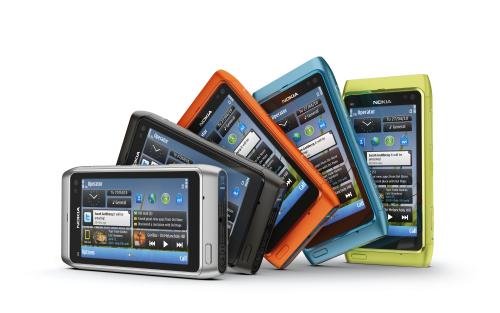
Seven reasons to buy the Nokia Lumia 920
|
Bookmark this post:
blogger widgets
Social Bookmarking Blogger Widget
|
|
Wednesday, October 26, 2011
Nokia Lumia 710 Windows Phone - Specification
The purposely built, no-nonsense Nokia Lumia 710 can be personalized with exchangeable back covers and thousands of apps to bring the Lumia experience to more people around the world. The Nokia Lumia 710 is designed for instant social & image sharing, and the best browsing experience with IE9. It is available in black and white with black, white, cyan, fuchsia and yellow back covers. With the same 1.4 GHz processor, hardware acceleration and graphics processor as the Nokia Lumia 800, the Nokia Lumia 710 delivers high performance at an affordable price.
Nokia’s second Windows Phone 7 device is running on the latest Mango 7.5 build that comes with Internet Explorer 9, photo editing tools,multitasking, new Xbox live, deep Facebook, Twitter, and LinkedIn integration, Contacts Groups with Live Tile support, and many others.
Personalize it to suit you with colors and thousands of applications
- Change covers to suit your mood - available in black and white with covers in five different colors
- Personalize your start screen the way you want it
- Group people based on how they fit into your life and pin individuals to the start screen for group conversations and photo sharing
- Keep in sync with Facebook, Twitter and LinkedIn
- Chat and SMS messages in one conversation
- Shoot, share and see photos easily
- Browse with the fast and familiar Internet Explorer 9
- Pin individual web pages to start menu
- Instant search from Bing as you type
- Switch smoothly between tasks
- Nokia Drive with turn by turn voice navigation available for more than 100 countries. Nokia Maps available from Marketplace at sales start
- Nokia Music and Mix Radio: Enjoy music from the world’s most locally relevant catalog (14 million tracks). 100 great radio channels with something for everyone. Nokia Music Store available in 20 countries and Mix Radio in 12 countries.
- Contacts transfer help users migrate phonebook contacts from other devices and platforms
- App Highlights promotes locally relevant apps and content
- XBOX Live Hub offers cool games, capability to see friends’ presence and leaderboards, 3D Avatar control and creation
- Outlook Mobile for corporate email and private email support
- Nokia Lumia 800 handset
- Nokia Fast USB Charger AC-16
- Nokia Charging and Data Cable CA-185CD
- Nokia Stereo Headset WH-902
- Soft cover, color match to phone
- Quick Guide, User Guide and Product information leaflet
- Nokia Purity Stereo Headset by Monster (in-ear), Nokia Purity HD Stereo Headset by Monster (on-ear)
- Colourful and exciting portfolio of Bluetooth headsets, wireless speakers, car holder, charger, protective pouches, soft covers and functional cases
- Black, Cyan, Magenta
- Networks: WCDMA 850/900/1900/2100, GSM/EDGE 850/900/1800/1900
- Speed: HSDPA cat 10: 14.4 Mbps, HSUPA cat 6: 5.76 Mbps
- Display: 3.7” WVGA (800x480) AMOLED capacitive touch ClearBlack display with pinch zoom, 2.5D curved glass seamlessly integrated to unibody
- OS: Windows Phone Release - Mango
- Memory: 16GB internal user memory, 512MB program memory
- Camera: 8Mpix auto-focus Carl Zeiss, LED flash, Video capturing MPEG-4 720p @ 30 fps
- Size/Weight: 116.5 mm x 61.2 mm x 12.1 mm (LxWxT) / 76.08 cc / 142 g
- Connectivity: WLAN 802.11 b/g/n, Bluetooth 2.1, A-GPS, micro-USB connector and charging, 3.5mm AHJ connector, Accelerometer, Proximity, Magnetometer, ALS
- Processor: 1.4 Ghz Single Core MSM8255 (WCDMA)
- Audio: MP3 player, Audio jack: 3.5mm, Supported codecs: mp3, AAC, AAC+, eAAC+, m42, m4b, wma, EVRC, QCELP
- Battery: 1450 mAh
- Talk time: (GSM/WCDMA) up to 13 h/9.5h
- Standby time: (GSM/WCDMA) up to 265h/up to 335 h
- Music playback: up to 55 hours
|
Bookmark this post:
blogger widgets
Social Bookmarking Blogger Widget
|
|
Nokia Lumia 800 Windows Phone - Specification
The stunningly social Nokia Lumia 800 features head-turning design, vivid colors (cyan, magenta and black) and the best social and Internet performance, with one-touch social network access, easy grouping of contacts, integrated communication threads and Internet Explorer 9. It features a 3.7 inch AMOLED ClearBlack curved display blending seamlessly into the reduced body design, and a 1.4 GHz processor with hardware acceleration and a graphics processor. The Nokia Lumia 800 contains an instant-share camera experience based on leading Carl Zeiss optics, HD video playback, 16GB of internal user memory and 25GB of free SkyDrive storage for storing images and music.
The Nokia Lumia 800 was revealed to the attendants of the Nokia World 2011 event, and, just like everyone predicted, it will be the flagship of the Lumia line-up (“Lumia” means “light,” and represents the dawns of a new Nokia start).Nokia announced that the flagship of the Lumia line-up will hit the market in November 2011, at a price of 420 EUR (about 580 USD, if you are reading this from US), taxes not included.
Head-turning design
- Smooth, one piece body
- Screen that brings content to the surface
- Vivid colors that stand out from the crowd
- Instant combined Facebook, Twitter and LinkedIn feeds, chat and SMS messages in one conversation
- From pocket to photo to Facebook in seconds
- New Internet Explorer 9 just like on your computer
- Buttery smooth experience, lightning fast performance, broad support of Internet standards for HTML5 applications
- Nokia Drive with turn by turn voice navigation available for more than 100 countries. Nokia Maps available from Marketplace at sales start
- Nokia Music and Mix Radio: Enjoy music from the world’s most locally relevant catalog (14 million tracks). 100 great radio channels with something for everyone. Nokia Music Store available in 20 countries and Mix Radio in 12 countries.
- Contacts transfer help users migrate phonebook contacts from other devices and platforms
- App Highlights promotes locally relevant apps and content
- Excellent camera. Superior shooting with Carl Zeiss optics and HD video
- XBOX Live Hub offers cool games, capability to see friends’ presence and leaderboards, 3D Avatar control and creation
- Outlook Mobile for corporate email and private email support
- Networks: WCDMA 850/900/1900/2100, GSM/EDGE 850/900/1800/1900
- Speed: HSDPA cat 10: 14.4 Mbps, HSUPA cat 6: 5.76 Mbps
- Display: 3.7” WVGA (800x480) AMOLED capacitive touch ClearBlack display with pinch zoom, 2.5D curved glass seamlessly integrated to unibody
- OS: Windows Phone Release - Mango
- Memory: 16GB internal user memory, 512MB program memory
- Camera: 8Mpix auto-focus Carl Zeiss, LED flash, Video capturing MPEG-4 720p @ 30 fps
- Size/Weight: 116.5 mm x 61.2 mm x 12.1 mm (LxWxT) / 76.08 cc / 142 g
- Connectivity: WLAN 802.11 b/g/n, Bluetooth 2.1, A-GPS, micro-USB connector and charging, 3.5mm AHJ connector, Accelerometer, Proximity, Magnetometer, ALS
- Processor: 1.4 Ghz Single Core MSM8255 (WCDMA)
- Audio: MP3 player, Audio jack: 3.5mm, Supported codecs: mp3, AAC, AAC+, eAAC+, m42, m4b, wma, EVRC, QCELP
- Battery: 1450 mAh
- Talk time: (GSM/WCDMA) up to 13 h/9.5h
- Standby time: (GSM/WCDMA) up to 265h/up to 335 h
- Music playback: up to 55 hours
|
Bookmark this post:
blogger widgets
Social Bookmarking Blogger Widget
|
|
Thursday, May 19, 2011
U2opia Launches Fonetwish Service For Facebook Access on Airtel in India
U2opia Mobile, a Singapore-based mobile solutions provider has launched Fonetwish, a platform for accessing Facebook via USSD (Unstructured Supplementary Service Data) in partnership with telecom provider Airtel. The service has been developed jointly with Facebook and it’s the first of its kind.
USSD (Unstructured Supplementary Service Data) is a menu-based system that allows interfacing with content based services. Unlike a normal browser, the USSD menu acts as browser to pull content to the phone, hence it does so without using the internet or activating GPRS capabilities.
Airtel’s 150 million Indian customers will be able to update their Facebook status for free, but to use other features like viewing, commenting, posting on friends walls, confirming friend requests, ‘Like’ news feeds, view notifications and finding and adding friends, they will have to pay a minimal charge of Re 1 per day.
The users will have to dial *325# (“*fbk#” for non-qwerty mobile handsets) from their handsets which will open a menu that will prompt the user to enter their Facebook username and password and after the one-time registration, a text menu is displayed for browsing through content.
“Although smartphones are available in India, the number of users are not very high. Fonetwish will allow everyone with a mobile phone to access Facebook on their mobiles,” said Sumesh Menon, Co-Founder and CEO, U2opia Mobile, speaking to Techcircle.in. “Currently the USSD based service is only available on Airtel but talks are ongoing with other telecom operators for similar services. We are also looking at expanding our services to other countries like Indonesia and Philippines.”
|
Bookmark this post:
blogger widgets
Social Bookmarking Blogger Widget
|
|
Monday, November 29, 2010
Trace any mobile number location and operator details across India using Facebook
In this post I am going to tell you some ways with which you can trace any mobile number in India. With rapid growth in mobile phone subscribers in India and low call rates, most calls we receive on our mobile are from other mobiles. Mobile Tracer on Facebook and Mobile Tracer on Digitalcrunch.in will help you to trace any mobile number within India.
With Mobile Tracer on Facebook you can publish the traced mobile number details on your wall and share it with your friends. Its fun with work. To access this you should have a facebook account. Mobile Tracer on Digitalcrunch.in provides the facility to know the details of traced mobile with a pictorial view of the location in maps.
(Read more inside ..)
|
Bookmark this post:
blogger widgets
Social Bookmarking Blogger Widget
|
|
Thursday, July 22, 2010
FCam released for the Nokia N900 | Download FCam
The advisers accept already created a alternation of new photography apps for the platform, some of which will aswell be chargeless to download. These three will be accessible from the FCam activity pages .
FCamera is an archetype camera appliance that uses FCam libraries and drivers. It is appear in antecedent cipher to serve as a starting point for programmers to actualize their own camera applications.
|
Bookmark this post:
blogger widgets
Social Bookmarking Blogger Widget
|
|
Sunday, July 4, 2010
Nokia X5 - the social jukebox on the move goes Official | Specification | Release Date| Price
Nokia unveiled the new Nokia X5, its latest full QWERTY music device with 5 MP camera which makes messaging, social networking and listening to your favourite music fun and easy when on the move in Singapore - At its 10th Nokia Connection event. The unique, square slider design makes it a perfect device for teens who enjoy Facebook, chatting, games, music and staying in touch with their peers in unlimited ways.
Favourite contacts, emails and social networking sites can be accessed directly from the home screen which makes sending messages and status updates a breeze. Thousands of games and other social networking, entertainment and personalisation apps can be downloaded from Ovi Store. On top of that, the Nokia X5 has a great music player with excellent sound quality and loud speakers, offering easy access to the device’s music collection with space for up to 1000 tracks with a 2 GB in-box memory card, expandable up to 32GB . In select markets, the Nokia X5 will include Nokia’s Comes With Music, the unlimited music download service with access to millions of tracks. With the fun “Surprise Me” feature, you can spin the phone when playing music to jump to a random track. Available in a variety of cool colours.
The Nokia X5 is expected to begin shipping during the third quarter of 2010 with an estimated retail price of EUR 165 before taxes and subsidies.
Specification
Technical Profile
- System:WCDMA 850/1900/2100WCDMA 900/1900/2100GSM/EDGE 850/900/1800/1900
- User Interface:S60 platform 3rdEdition
- Dimensions:74.3 mm x 66.4 mm x 16.8 mm (L x W x T)
- Volume:113,4 ccWeight:129 g (including battery)
- Display:2,36” QVGA with up to 262k colors (320x240)
- Memory:Up to 200 MB internal memory, support for up to 32 GB microSD memory card
Operating times
- Standby time:Up to 16 days
- Talk time:Up to 4 hours (GSM), up to 3,5 hrs (3G)
- Music playback:Up to 24 hrs
Standard Sales Package Includes
- Nokia X5-01 handset
- Nokia Battery BL-5F, 950 mAh
- Nokia Travel Charger AC-6
- Nokia Headset WH-102
- Nokia 2 GB microSD card MU-37
- Nokia Connectivity Cable CA-101DNokia
Nokia Original Accessories
- Headsets:
- Nokia Bluetooth Stereo HeadsetBH-504
- Nokia Bluetooth Stereo HeadsetBH-214
- Nokia Stereo Headset WH-500
- Music:Nokia Mini Speaker MD-9
- Data:Nokia 32 GB microSDHC Card MU-44
Inbox Colors
- Pink, Azure, Graphite Black, Yellow Green, Purple
Key Features
- Social networking and messaging
- Full QWERTY keyboard for easy typing
- Easy access to social networking sites (Facebook,Twitter, Hi5, MySpace)
- Favorite IM accounts supported (such as Yahoo!® Messenger, Google Talk™,Windows Live™ Messenger, Ovi Chat)
- Log in to multiple email accounts (such as Yahoo!® Mail, Gmail™, Windows Live™ Hotmail, Ovi Mail)
- Favorite contacts on the home screen
- Square, compact design optimized for social networking and messaging
- Shake the phone to find out the number of unread messages
Music
- Excellent sound quality and loud speakers
- Discover and download tracks from Ovi Music
- Store up to 1 000* tracks to your device
- Comes With Music in select markets
- Quick access to music with dedicated music key
- Music player support MP3, AAC, eAAC+ and WMA
- FM stereo radio
- Spin the phone when playing music to jump to a random track
Additional features
- 5 megapixel camera with 4x digitial zoom, LED flash
- Share photos and videos with Ovi Share
- Games and applications from Ovi Store
- Ovi Suite
- Ovi ContactsData
Services and Connectivity
- WLAN
- GPRS/EGPRS multislot class 32
- Bluetooth 2.1 with enhanced data rates (EDR)
- Micro-USB connector, USB charging
- 3.5 mm AV connector
Via [Nokia]
(Read more inside ..)
|
Bookmark this post:
blogger widgets
Social Bookmarking Blogger Widget
|
|
Tuesday, May 11, 2010
Nokia N8 goes official | Specification | Release Date| Price
The Nokia N8 introduces a 12 megapixel camera with Carl Zeiss optics, Xenon flash and a large sensor that rivals those found in compact digital cameras. Additionally, the Nokia N8 offers the ability to make HD-quality videos and edit them with an intuitive built-in editing suite. Doubling as a portable entertainment center, people can enjoy HD-quality video with Dolby Digital Plus surround sound by plugging into their home theater system. The Nokia N8 enables access to Web TV services that deliver programs, news and entertainment from channels like CNN, E! Entertainment, Paramount and National Geographic. Additional local Web TV content is also available from the Ovi Store.
Social networking is second nature to the Nokia N8. People can update their status, share location and photos, and view live feeds from Facebook and Twitter in a single app directly on the home screen. Calendar events from social networks can also be transferred to the device calendar.
The Nokia N8 comes with free global Ovi Maps walk and drive navigation, guiding people to places and points of interest in more than 70 countries worldwide. Powering the Nokia N8 is Symbian ^3, the latest edition of the world’s most used smartphone software.
Available in select markets during the third quarter of 2010, the estimated retail price of the Nokia N8 is EUR 370.
Nokia N8 Highlights:
HD quality imaging and cinematic sound
- Shoot and edit photos and video with supreme clarity of a 12 MP camera with Carl Zeiss optics
- Dolby Digital Plus Surround Sound and HDMI connection to a home entertainment system
- Personal touches come to life on three fully customizable home screens
- Instant access to Ovi Store’s apps, games and other cool content
- Web TV delivers local and global TV favorites right to the home screen
- Get live updates from Facebook, Twitter, and RenRen pushed right to your home screen, with feeds visible at a single glance
- Connect from anywhere on your phone—your home screen, contacts, or map
- Enrich your social network experience with content from your phone including pictures, location and more
- Free worldwide satellite car and walk navigation from Ovi Maps in over 70 countries
- Built in premium guides from Lonely Planet and Via Michelin for tips on travel, restaurants, weather, and hotels
- Talk time (GSM/WCDMA) –12/5 h 50min
- Standby (GSM/WCDMA) –390/400 h
- Video record –3 h 20 min
- Music playback –50 h
- Video playback –7 h
- Video playback with HDMI –6 h
- Web TV –3 h 20 min
- Nokia Stereo Headset WH-701 (in box)
- Nokia Bluetooth Stereo Headset BH-905
- Nokia Bluetooth Headset BH-608
- Nokia Extra Battery DC-11
- Nokia Bluetooth Stereo Headset BH-214
- Nokia Bluetooth Stereo Headset BH-505
- Nokia Mini Speaker MD-9
Technical Profile:
System: WCDMA 850/900/1700/1900/2100 and GSM/EDGE 850/900/1800/1900
OS: Symbian^3
Form Factor: Touch screen monoblock
Dimensions: 113.5 x 59.12 x 12.9 mm (L x W x H)
Weight: 135g
Display: 3.5 inch widescreen (640 x 360 pixels) capacitive touch
Battery: 1200mAh BL-4D
Media Storage/Memory: 16GB mass memory + micro SD card slot, 135MB internal memory, support up to 32GB memory cards. RAM256 ROM512
Video Playback: Video recording, Performance: encoding 25fps, decoding 30fps, File Formats: H.264, MPEG-4, VC-1, H.263, Real Video 10, ON2 VP6, Flash video
Music Playback: FM radio, FM transmitter, MP3 player,
Supported codecs: MP3,AAC,eAAC,eAAC+,WMA,AMR-WB, DRM support, DRM:OMA DRM 2.0
Main Camera:
- Lens: Carl Zeiss optics
- Image capture: 12 megapixels
- Video capture: HD 720p
- Aperture: F2.8
- Focal length: 5.4
- Flash: Xenon flash
- Nokia Adapter Cable for HDMI CA-156
- WLAN IEEE802.11 b/g/n
- BT3.0 with support for stereo headsets
- Positioning with GPS, A-GPS, WLAN and Cell-ID
- Micro-USB 2.0 high speed for file transfers and charging
- USB On-the-Go
- Nokia AV connector 3.5 mm for audio input/output and TV out
- HSDPA Cat9, maximum speed up to 10.2 Mbps, HSUPA Cat5 2.0 Mbps
Via[Nokia]
(Read more inside ..)
|
Bookmark this post:
blogger widgets
Social Bookmarking Blogger Widget
|
|
Wednesday, May 5, 2010
Nokia Launches C6 in India
For more Nokia India
(Read more inside ..)
|
Bookmark this post:
blogger widgets
Social Bookmarking Blogger Widget
|
|
Monday, January 18, 2010
LG releasing Windows Mobile 7 phone in September and Android 2.1 in April
First LG flat-out says on public record that Windows Mobile 7 is bound for 2010, and now we've gotten apparent word that the company has narrowed said release window to September of this year -- at least as far as its own devices are concerned.
That comes via high-profile French tech blogger Eric of Presse Citron, who while attending a LG Design Lab tweeted (both in French and immediately after in English) that LG Mobile will release a Windows Mobile 7 device in September and an Android 2.1 device in April, first in the US and then Europe just after. The tweets are now gone, but WMPoweruser managed to catch both via Google cache, while we have corroborated just the French one by similar means. So, misheard claims from the company or accidental slip-up of NDA'd secrets? MWC is starting to look more and more interesting.
Via [WMPoweruser]
(Read more inside ..)
|
Bookmark this post:
blogger widgets
Social Bookmarking Blogger Widget
|
|
Thursday, November 19, 2009
How to create ringtones from YouTube videos
Searching new ringtones for your pretty mobile phones. I have a site madringtones for you where you can create mp3 ringtones for your mobile phone from your favourite YouTube videos or any music file from your computer.
Steps:
- Open your favourite video in YouTube, whose mp3 ringtone you want to create for your mobile phone.
- Copy the link from the address bar of your favourite YouTube video eg: http://www.youtube.com/watch?v=7kV-5vc-vrk
- Open madringtones.org and paste the link of your favourite YouTube video you have copied from the address bar.
- You can upload files from your computer or any web link also.
- Click on the Play button, it will start uploading the file and then press Save to save the mp3 file
- After saving it will allow you to download the saved file in mp3,amr,ogg formats
- Now send the downloaded file to your mobile phone and enjoy the ringtones.
(Read more inside ..)
|
Bookmark this post:
blogger widgets
Social Bookmarking Blogger Widget
|
|
Sunday, August 23, 2009
Nokia 5800 Navigation Edition is on its way to market
Nokia 5800 Navigation Edition comes preloaded with Ovi Maps and lifetime licenses for voice-guided driving and walking directions. As accessories Nokia 5800 Navigation Edition has in-box a car charger and Nokia car kit just like TomTom iPhone car kit. One bad thing that it will come with black and chrome combo color. So choice of any other color. Below in the video you will know more about the new Nokia 5800 Navigation Edition.
It's price will be around €285 (about $410, Rs. 20,000)and is coming in third quarter of this year.
(Read more inside ..)
|
Bookmark this post:
blogger widgets
Social Bookmarking Blogger Widget
|
|
Wednesday, August 5, 2009
How to send file to mobile from computer using java application through bluetooth
Here is the source code for the sending files to mobiles from computer/pc using java application or j2me code through bluetooth as transmission medium.Many of us means amateur java and j2me programmer find it difficult to use bluetooth in java application as java development kit has no bluetooth library to use. As I have mentioned in my previous posts Bluecove is a J2SR-82 project meant for acessing bluetooth stack from java (java standard edition) .
So, for sending files from pc to mobile using java application through bluetooth. You must download Bluecove() and place it in both the runtime library extension folder of jre and jdk i.e "C:\Programs Files \Java\jre1.6.0\lib\ext" and "C:\Programs Files \Java\jdk1.6.0\jre\lib\ext" or the place where you have installed java under that find these two paths "jre1.6.0\lib\ext" and "jdk1.6.0\jre\lib\ext".
Before starting you must have bluetooth stack installed in your computer as mentioned in my previous post "Bluetooth Mobile Webcam - A Java & J2me based Project"
Change one thing in the code :
"File file = new File("D:/cmd.jpg");
InputStream is = new FileInputStream(file);
byte filebytes[] = new byte[is.available()];
is.read(filebytes);
is.close();"
Find this part in the code "File file = new File("D:/cmd.jpg")" and change the file path to your desired file path that you want to send to mobile.
eg: C:\test.txt
Now, compile this code and run it ....
Source Code Started:
import java.io.File;
import java.io.FileInputStream;
import java.io.IOException;
import java.io.InputStream;
import java.io.OutputStream;
import java.util.Vector;
import javax.bluetooth.DataElement;
import javax.bluetooth.DeviceClass;
import javax.bluetooth.DiscoveryAgent;
import javax.bluetooth.DiscoveryListener;
import javax.bluetooth.LocalDevice;
import javax.bluetooth.RemoteDevice;
import javax.bluetooth.ServiceRecord;
import javax.bluetooth.UUID;
import javax.microedition.io.Connection;
import javax.microedition.io.Connector;
import javax.obex.ClientSession;
import javax.obex.HeaderSet;
import javax.obex.Operation;
/**
*
* Class that discovers all bluetooth devices in the neighbourhood,
*
* Connects to the chosen device and checks for the presence of OBEX push service in it.
* and displays their name and bluetooth address.
*
*
*/
public class BluetoothServiceDiscovery implements DiscoveryListener{
//object used for waiting
private static Object lock=new Object();
//vector containing the devices discovered
private static Vector vecDevices=new Vector();
//vector containing the services discovered
private static Vector vecServices=new Vector();
private static String connectionURL=null;
/**
* Entry point.
*/
public static void main(String[] args) throws IOException
{
BluetoothServiceDiscovery bluetoothServiceDiscovery=new BluetoothServiceDiscovery();
//display local device address and name
LocalDevice localDevice = LocalDevice.getLocalDevice();
System.out.println("Address: "+localDevice.getBluetoothAddress());
System.out.println("Name: "+localDevice.getFriendlyName());
//find devices
DiscoveryAgent agent = localDevice.getDiscoveryAgent();
System.out.println("Starting device inquiry...");
agent.startInquiry(DiscoveryAgent.GIAC, bluetoothServiceDiscovery);
try {
synchronized(lock){
lock.wait();
}
}
catch (InterruptedException e) {
e.printStackTrace();
}
System.out.println("Device Inquiry Completed. ");
//print all devices in vecDevices
int deviceCount=vecDevices.size();
if(deviceCount <= 0){
System.out.println("No Devices Found .");
}
else{
//print bluetooth device addresses and names in the format [ No. address (name) ]
System.out.println("Bluetooth Devices: ");
for (int i = 0; i < devicecount; i++)
RemoteDevice remoteDevice=(RemoteDevice)vecDevices.elementAt(i);
System.out.println((i+1)+". "+remoteDevice.getBluetoothAddress());//+" ("+remoteDevice.getFriendlyName(true)+")");
}
}
// System.out.print("Choose the device to search for Obex Push service : ");
// BufferedReader bReader=new BufferedReader(new InputStreamReader(System.in));
// String chosenIndex=bReader.readLine();
// System.out.println(chosenIndex);
// int index=Integer.parseInt(chosenIndex);
// System.out.println(chosenIndex);
for(int j = 0; j < deviceCount; j++)
{
//check for obex service
RemoteDevice remoteDevice=(RemoteDevice)vecDevices.elementAt(j);
UUID[] uuidSet = {new UUID("1105", true)};
int[] attrSet = {0x0100, 0x0003, 0x0004};
System.out.println("\nSearching for service...");
int transID = agent.searchServices(attrSet,uuidSet,remoteDevice,bluetoothServiceDiscovery);
System.out.println("Service Search in Progress ("+transID+")");
try {
synchronized(lock)
{
lock.wait();
}
}
catch (InterruptedException e)
{
e.printStackTrace();
}
//System.out.println("Service Discovery Completed. ");
System.out.println("Opening a connection with the server.... ");
// connection creation & sending file
try
{
Connection connection = Connector.open(connectionURL);
System.out.println("Connection obtained");
ClientSession cs = (ClientSession)connection;
HeaderSet hs = cs.createHeaderSet();
cs.connect(hs);
System.out.println("OBEX session created");
//System.out.println("Response code of the server after connect..." +hs.getResponseCode());
File file = new File("D:/cmd.jpg");
InputStream is = new FileInputStream(file);
byte filebytes[] = new byte[is.available()];
is.read(filebytes);
is.close();
hs = cs.createHeaderSet();
hs.setHeader(HeaderSet.NAME, file.getName());
hs.setHeader(HeaderSet.TYPE, "image/jpeg");
hs.setHeader(HeaderSet.LENGTH, new Long(filebytes.length));
Operation putOperation = cs.put(hs);
System.out.println("Pushing file: " + file.getName());
System.out.println("Total file size: " + filebytes.length + " bytes");
OutputStream outputStream = putOperation.openOutputStream();
outputStream.write(filebytes);
System.out.println("File push complete");
outputStream.close();
putOperation.close();
cs.disconnect(null);
connection.close();
}
catch(Exception e)
{
System.out.println("connection:"+e);
}
}
}
/**
* Called when a bluetooth device is discovered.
* Used for device search.
*/
public void deviceDiscovered(RemoteDevice btDevice, DeviceClass cod) {
//add the device to the vector
if(!vecDevices.contains(btDevice))
{
vecDevices.addElement(btDevice);
}
}
/**
* Called when a bluetooth service is discovered.
* Used for service search.
*/
public void servicesDiscovered(int transID, ServiceRecord[] servRecord) {
/*if(servRecord!=null && servRecord.length>0)
{
connectionURL=servRecord[0].getConnectionURL(0,false);
System.out.println(connectionURL+"--"+servRecord);
}*/
for(int i = 0; i < servRecord.length; i++)
{
//vecServices=servRecord[i].getConnectionURL(0,false);
DataElement serviceNameElement = servRecord[i].getAttributeValue(0x0100);
String _serviceName = (String)serviceNameElement.getValue();
String serviceName = _serviceName.trim();
System.out.println(_serviceName);
if(serviceName.equals("OBEX Object Push"))
{
System.out.println("[client:] A matching service has been found\n");
try
{
connectionURL = servRecord[i].getConnectionURL(0,false);
System.out.println(connectionURL+"\n");
} catch (Exception e)
{
System.out.println("[client:] oops");
}
}
}
}
/**
* Called when the service search is over.
*/
public void serviceSearchCompleted(int transID, int respCode) {
/*synchronized(lock)
{
lock.notify();
}*/
String searchStatus = null;
if (respCode == DiscoveryListener.SERVICE_SEARCH_DEVICE_NOT_REACHABLE) {
searchStatus = "SERVICE_SEARCH_DEVICE_NOT_REACHABLE\n";
}
else if (respCode == DiscoveryListener.SERVICE_SEARCH_NO_RECORDS) {
searchStatus = "SERVICE_SEARCH_NO_RECORDS\n";
}
else if (respCode == DiscoveryListener.SERVICE_SEARCH_COMPLETED) {
searchStatus = "SERVICE_SEARCH_COMPLETED\n";
}
else if (respCode == DiscoveryListener.SERVICE_SEARCH_TERMINATED) {
searchStatus = "SERVICE_SEARCH_TERMINATED\n";
}
else if (respCode == DiscoveryListener.SERVICE_SEARCH_ERROR) {
searchStatus = "SERVICE_SEARCH_ERROR\n";
}
System.out.println("[client:] " + searchStatus);
synchronized(lock)
{
lock.notify();
}
}
/**
* Called when the device search is over.
*/
public void inquiryCompleted(int discType) {
switch (discType)
{
case DiscoveryListener.INQUIRY_COMPLETED :
System.out.println("INQUIRY_COMPLETED");
break;
case DiscoveryListener.INQUIRY_TERMINATED :
System.out.println("INQUIRY_TERMINATED");
break;
case DiscoveryListener.INQUIRY_ERROR :
System.out.println("INQUIRY_ERROR");
break;
default :
System.out.println("Unknown Response Code");
break;
}
synchronized(lock)
{
lock.notify();
}
}//end method
}//end class
(Read more inside ..)
|
Bookmark this post:
blogger widgets
Social Bookmarking Blogger Widget
|
|
Monday, March 9, 2009
How to hack cellphones
Hey Guys want to hack cell phones, get full access to the hacked cell phone phone-book, SMS, call log, cell information & many more stuffs to do. Like you can make a call from the hacked one to any number, put the hacked cell phone in ringing or silent mode , increase or decrease the volume ,etc. Now you must be eager to know 'How to hack cell phone' here is a stuff for you guys. Just download it and install it in your cell phones.
Prerequisites: Cell phone must be -
- J2me or java enabled
- Bluetooth enabled
- Install the downloaded *.jar file in your cell phone.
- Follow the instruction provided here for configuration. (instruction)
- Now enjoy!
Download links:
Video preview 'How to hack cell phone'
(Read more inside ..)
|
Bookmark this post:
blogger widgets
Social Bookmarking Blogger Widget
|
|