
Code for passing values from child window to parent window using Javascript and HTML. I am working on a project where I need to access parent page variables from child page without using GET and POST methods. Searched the net and got a technique to complete the work i.e using 'window.opener' properties.
Code for Parent HTML Page
Use window.open to open a new window. The following code opens a new window without toolbars, menubars, etc
<!DOCTYPE HTML PUBLIC "-//W3C//DTD HTML 4.0 Transitional//EN">
<HTML>
<HEAD>
<TITLE> Parent </TITLE>
<META NAME="Generator" CONTENT="Bishwajeet">
<META NAME="Author" CONTENT="">
<META NAME="Keywords" CONTENT="">
<META NAME="Description" CONTENT="">
<SCRIPT TYPE="text/javascript">
function sendTo()
{
window.open('child_blog.html','_blank','resizable=yes,width='+(screen.width-500)+',height='+(screen.height-500)+'');
}
</SCRIPT>
</HEAD>
<BODY>
<input type="text" value="" name="text1" id="pdetails1">
</br>
<a href="javascript:void(0)" onClick="sendTo()" >Pop Up</a>
</BODY>
</HTML>
Code for Child HTML Page
In the newly opened window, you can access the original window by using window.opener
<!DOCTYPE HTML PUBLIC "-//W3C//DTD HTML 4.0 Transitional//EN">
<HTML>
<HEAD>
<TITLE> Child </TITLE>
<META NAME="Generator" CONTENT="Bishwajeet">
<META NAME="Author" CONTENT="">
<META NAME="Keywords" CONTENT="">
<META NAME="Description" CONTENT="">
<SCRIPT TYPE="text/javascript">
function sendValue()
{
window.opener.document.getElementById('pdetails1').value=document.getElementById('details1').value;
window.close();
}
</SCRIPT>
</HEAD>
<BODY>
<form name="selectform">
<input name="details1" id="details1" value=""><br/>
<input type=button value="Copy input to parent opener" onClick="sendValue();">
</form>
</BODY>
</HTML>
(Read more inside ..)
Showing posts with label HTML. Show all posts
Showing posts with label HTML. Show all posts
Tuesday, May 18, 2010
How to pass values from child window to parent window using Javascript XHTML


|
Bookmark this post:
|


|
Tuesday, September 29, 2009
Free CSS Menu - High quality websites navigation menu - Part 1

Free CSS3 Menus for your websites. Cascading Style Sheets (CSS) is a style sheet language used to design the look and format of a document written in a markup language. Its most common application is to style web pages written in HTML and XHTML.
CSS used for developing the navigation menu is CSS level 3 validated. Just download the source file and make what ever changes you want to do. Best viewed in Firefox and Chrome.
Two variant of the navigation menu:
- 500px wide : Click here to view
- 820px wide : Click here to view
For using the menu in your HTML page, website or blog :
- Include the css file (menu.css or menu_long.css) in between the head section of your html page and upload the css file to your web server, where your webpage is stored. Otherwise upload it to any free hosting site like Google Pages, x10hosting and link the css.
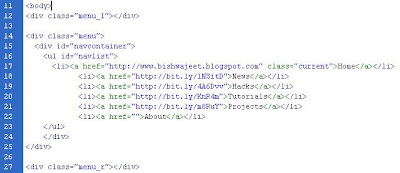 Copy and paste the the code from div class="menu_l" to div class="menu_r" from the source file(menu.html or menu_long.html) to your HTML page in between the body tag. Exactly as shown in the picture.


Download Source Files:
(Read more inside ..)
|
Bookmark this post:
|
|
Subscribe to:
Posts (Atom)


 Posts
Posts


